The Printer Lost Its Cable
 Mike Hirsch · · 3 min read
My home server needed an ethernet cable. My printer had one. This seemed like a simple trade.
When the P330 showed up to become my home server, it needed an ethernet cable. The only one in the house doing nothing essential was connecting my printer to my PC. The printer had always just worked, so I’d never bothered buying a USB cable for it. Easy call. The printer lost its cable.
Home Assistant is running, every sensor is reporting in, and I’ve moved on to NFC tag automations. NFC tags, it turns out, are identical one-inch white circles. You can’t tell them apart. They need labels. Labels need a printer.
So I audited every ethernet cable in the house and found exactly one spare. I plugged it into the printer. The printer did not care.
What followed was a lot of troubleshooting, far more than any printer deserves.
The printer is a Samsung Xpress C1860FW. It has Wi-Fi, and I tried it, with similar results and a lot less troubleshooting. The router is downstairs, and plugging the printer into it meant the middle of my living room floor.
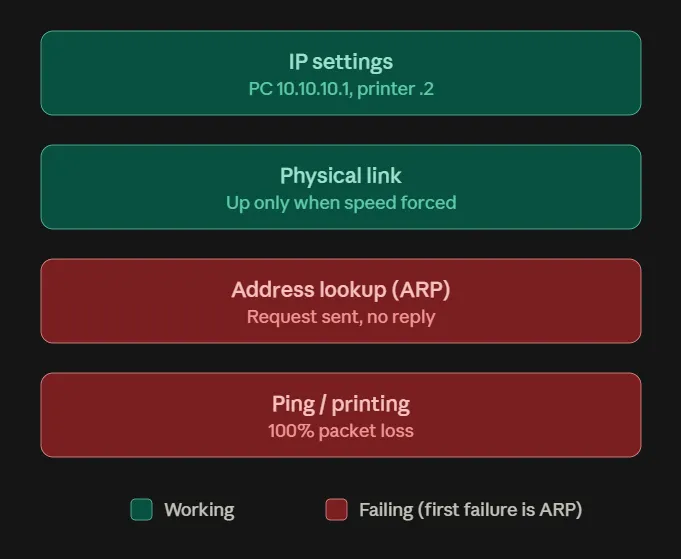
Over ethernet, the printer had given itself a 169.254.153.5 address, which is a printer’s way of saying nobody told it anything. The obvious subnet, 192.168.50.x, was already taken by my Wi-Fi. So both ends got static addresses on 10.10.10.x: the PC at .1, the printer at .2. Briefly, I also gave the printer .1. Two devices, one address. I fixed that.
Then Windows reported “Media disconnected.” The cable was plugged in and glowing at both ends, and Windows looked right at it and saw nothing. The link only came up after I forced the PC’s Intel I225-V adapter to 100 Mbps Full Duplex. The I225-V is a 2.5-gigabit chip. The printer has a 10/100 port. They couldn’t agree on how fast to talk, so they didn’t.
With the link up, nothing reached the printer anyway. So I ran a packet capture, which is not something I expected to do for a printer. The PC asked who had 10.10.10.2. Nobody answered. No ARP reply means the failure sits below any firewall, print driver, or printer software. The printer wasn’t refusing to print. It wasn’t admitting it had an address.
I tried everything else anyway.
The I225-V driver dates to February 2024. There’s nothing newer. Once the link was up, the adapter reported Up, Full Duplex through every one of those, the way a person says they’re fine. My best guess is the I225-V and this printer’s port just don’t get along. I never tested the printer against another device, so it isn’t fully off the hook.
Eventually I ordered the USB cable I’d never bothered to buy, waited two days, and it worked almost immediately, give or take a driver install. The printer serves one PC. It never needed an IP address.
I printed a whole page of labels. The Xbox got its cable back. Did I win? I wouldn’t call it that.